QA Testing Portfolio
Hotel Infinity
For Hotel Infinity, I led QA testing from June 2024, through launch in November of 2025, to post-launch support in December of 2025. I performed weekly build tests following our sprintly cadence, helping to secure a stable build every sprint. I led testing for all of our major milestone submissions and certification preparation and coordinated with our engineers and designs to get major fixes in the build. Testing across the various Quest devices and PS VR2 and consulting sequences and code in Unity gave me a strong working knowledge of the state and construction of the game’s major systems.
As a primarily roomscale VR game, QA testing Hotel Infinity presented a lot of novel challenges.
For one, our roomscale setup operated with a backend portal system, linking “quadrates” (individual rooms) together to form “zones,” the building blocks of each chaptered sequence.
Our engineers had to solve many complex problems to make the portal system as realistic as we wanted, to support features like carrying objects through portals and ensure lighting functioned seamlessly across portal boundaries. Additionally, there were also novel problems introduced by differences in the functionality of the consoles we were supporting. For example, varying performance thresholds across systems, or the PS VR2’s cable usage, which is described in more detail below.
Regular Build Testing
Consoles:
Meta Quest 2, 3, 3S
Sony PS VR2
(retail and dev kit)
Vive
Tools:
Jenkins
Unity IDE
Notion
Google Sheets
Sony Dev Net
I led weekly black-box and gray-box testing (using the Unity IDE), writing up QA reports and bug reports in our Notion database and delivering feedback to our designers and engineers as feedback. I also maintained the bug repository, ensuring the status of each bug was up-to-date.
Every other week, following our sprintly cadence, I ran regression tests across the Quest and PS VR2 to evaluate build stability. Crashes, softlocks, and other major issues were flagged to our engineers and designers for immediate attention. Through this system, the team successfully had a stable build candidate every sprint, a boon that aided us in controlling and managing the pool of bugs throughout development. I also wrote and continuously updated the test suites used in these tests (see below).
I also directed acceptance testing and smoke testing for every major milestone to Sony and Meta as well as our internal certification preparation. We passed every major milestone and certification and were able to keep our partners updated on build stability and our plans for fixing problematic bugs.
QA Test Suites
Tools:
Google Sheets
I authored QA test suites for QA team, regularly updating the templates to reflect changes to the build. These test suites were used for sprintly regression tests as well as acceptance tests for milestone submissions and certification.
Case Study: Performance Testing
Tools:
Debug Tools
OVR Metrics
Close to launch, our engineers discovered we were not making our intended performance thresholds for Quest 2. We had an automated performance testing tool built out by our engineering lead that ran an automated performance test on each zone in a chapter to calculate FPS. However, our external representatives were still encountering certain areas in bespoke zones, specifically certain portals/portal thresholds, where performance dipped significantly. This data wasn’t captured in the automated reports, which collected FPS using aggregate data across the whole zone. So, we decided a more bespoke performance testing method was in order.
Using our debug tools, I created a routine for examining each portal junction in search of performance drops. At each threshold, I would move the headset around at all angles, noting the specific instances in which performance tanked. Using OVR Metrics, I logged FPS and captured video footage for the exact location of the performance drops. This information was passed on to our engineers, who were able to fix the bespoke instances and bolster Quest 2 performance significantly.
Case Study: PS VR2 Cord Tangling
During the polish phase of development, some of our representatives at Sony flagged to us that the PS VR2 cable occasionally tangled around their feet while playing in roomscale, even pulling out the cord from the console. These were problems our internal team had noticed as well.
However, as we had already locked in the layout and spatial design of the main chapters, our team was presented the problem of how we were going to amend the cable tangling issues without upending months of work from our environment artists and level designers.
To get a more holistic evaluation of the cable issues across the entire game, I conducted a series of tests on the PS VR2, following the targeted path through the zones to see if there were any areas where the cable consistently tangled. I observed at numerous points in each chapter that the individual quadrates were connected in such a way that forced the player to make up to 10 to 20 consecutive turns in the same direction. Considering the 2m x 2m playspace, this essentially meant that players were walking continuously in a circle in the same direction, using up the extra cable length and tangling them.
I presented QA report logging the requisite number of same-direction turns for each quadrate-to-quadrate portal transition, highlighting the ones that tangled the cord while playing. I also included video footage of myself walking along a 2m x 2m playspace boundary outlined with tape to show 1) the exact pattern of movement that had led to the tangle and 2) to directly match the real-life playspace grid to the in-editor grid representing each quadrate.
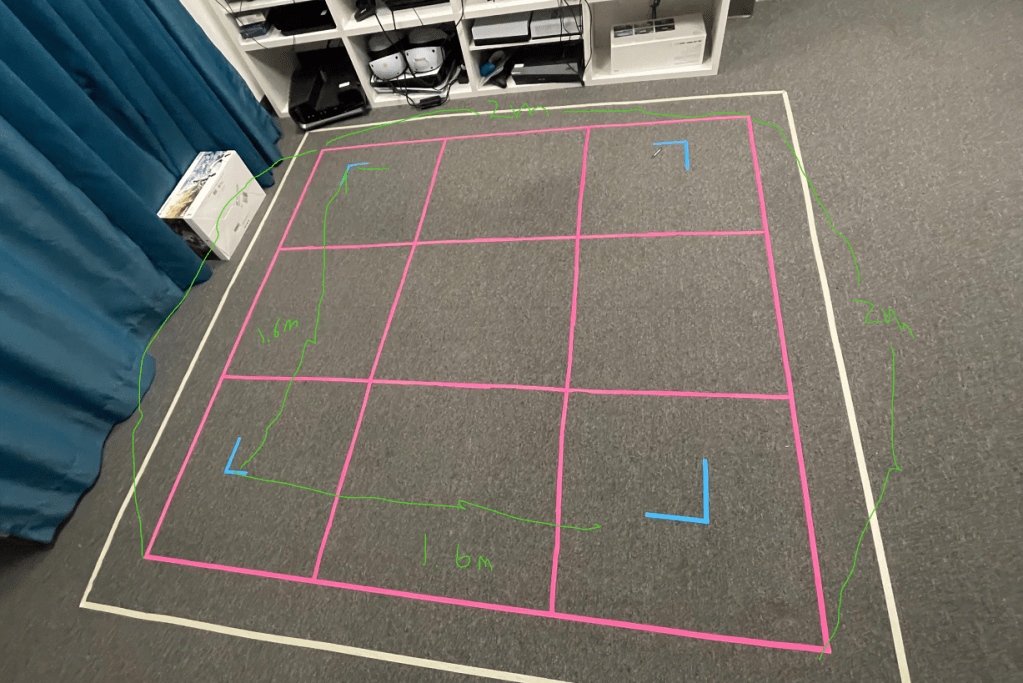
Using this information, our level designers were able to make slight modifications to the portal connections to break up any long chains of consecutive turns, with a few minor tweaks required to the associated art assets from our environment artists. The fixes were feasible even for the late stage in development and allowed us to preserve the pre-existing level flow and spatial design while still addressing the cable problem.
Performance Test Report Tool
Tools:
Google Sheets
Google Apps Script
Using Google Apps Script, I programmed a tool in Google Sheets to display performance data captured by our automated performance test in a concise report. Users could fill out the fields to get test information from a specific device, date and time, build number, etc.

